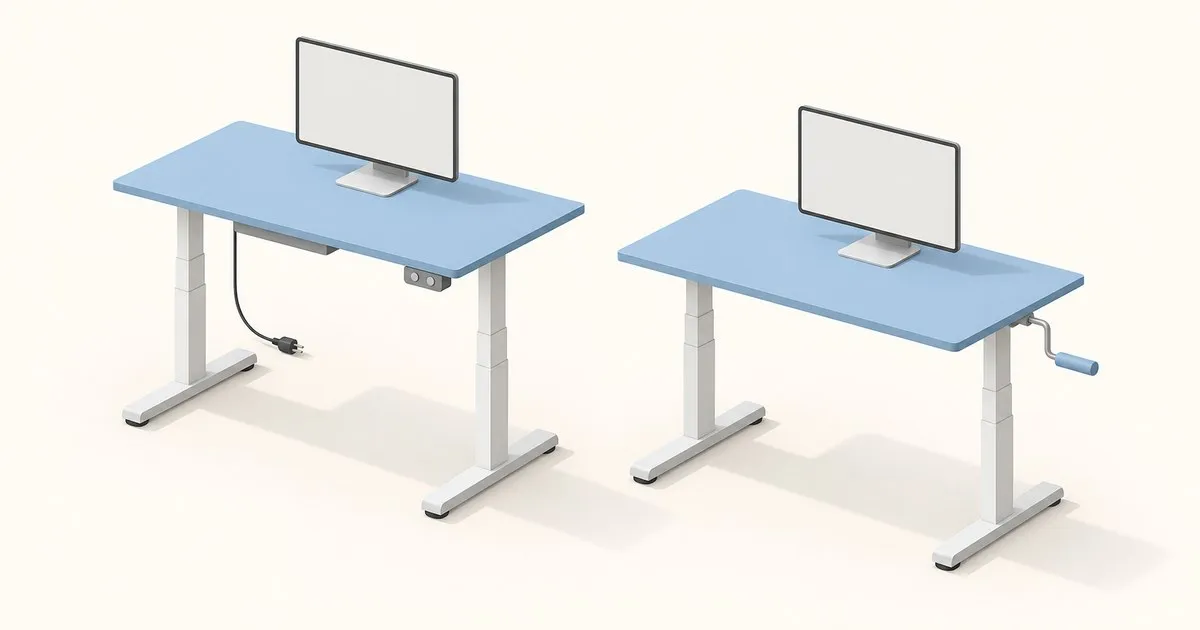
The electric vs manual standing desk decision comes down to whether adjustment effort will stop you changing position. For frequent transitions during a full workday, electric is the practical default. A crank desk makes sense when you can turn it comfortably, it reaches your seated height, and the complete setup costs less.
Electric vs manual standing desk: who should buy each?
Choose electric if you share a desk, change height frequently, or find cranking uncomfortable. Programmable presets can make returning to a suitable position easier: on the UPLIFT V3, automatic movement to saved heights requires an Advanced Keypad. Check the controller included in your quote.
Choose manual crank if you want adjustment without an outlet and can comfortably operate the handle with your equipment aboard. The VIVO DESK-V101M illustrates this simpler mechanism. For occasional desk use, that tradeoff may be reasonable; for a full day of position changes, judge the repeated effort before buying.
For either mechanism, body fit comes first. Shorter users should scrutinize minimum height; taller users need adequate standing reach. Price and branding cannot establish either.
Specs that matter: compare the same measurements
These are manufacturer ratings from the VIVO product page and UPLIFT C-frame specification sheet. Metric conversions are rounded. Both height ranges below exclude the desktop; the UPLIFT range excludes optional foot spacers.
| Specification | VIVO DESK-V101M manual frame | UPLIFT V3 electric C-frame |
|---|---|---|
| Frame height range | 27.8–46.5 in / 70.6–118.1 cm | 21.6–47.7 in / 54.9–121.2 cm |
| Published weight capacity | 132 lb / 60 kg | 355 lb / approximately 161 kg |
| Lift speed | Not published; depends on cranking | 2 in/s / 5.08 cm/s |
| Operating noise | No published dB figure | Below 48 dB, manufacturer rating |
| Motor/system power | No motor | 400 W system output rating; individual motor watts unspecified |
| Standby electricity | No powered lifting system | 0.1 W |
| Advertised warranty | 3 years | 15 years |
| User-height guidance | No stature range published; verify seated and standing elbow heights | Manufacturer suggests 5 ft–6 ft 3 in / approximately 152–191 cm with its desk configuration |
UPLIFT’s user-height guidance is a starting point. Measure your own keyboard position in both postures, then account for desktop thickness. If the lowest setting leaves your shoulders raised while typing, reject that configuration or budget for an appropriate keyboard tray.
A lifting-capacity figure does not establish resistance to wobble. Likewise, a system wattage rating cannot tell you how much electricity a day’s adjustments consume. The published noise figure is not a measurement of what your microphone will capture.
What the price difference actually buys
VIVO lists the manual frame at $139.99 at publication, with the desktop purchased separately. Compare complete delivered quotes including the top, controller, delivery and any installation work.
The electric premium is easier to justify when it buys a lower seated position or controls you will use. Treat an expensive wood finish as a finish upgrade. Preserve enough budget for a suitable chair and monitor placement: Mayo Clinic’s setup guidance considers these components together.
Adjustability to check before committing
With a crank desk, check handle reach, clearance and effort with your normal load. VIVO’s assembly manual shows a synchronization rod connecting the legs and a handle that pulls out and unfolds. Those assembly and access requirements matter in a tight room.
With electric, check keypad access and whether saved-height movement requires holding a button. During your return period, type at your actual standing height and watch the screens for distracting movement. Repeat with your monitor arms positioned as you use them.
Use your normal working layout for that check. A sparse, staged desktop will not reveal whether your working arrangement is comfortable.
Manual also includes assisted mechanisms. The UPLIFT Pneumatic Standing Desk uses pneumatic pistons without an outlet. It is an alternative to cranking; assess the required effort with your equipment before choosing it for painful hands or shoulders.
Long-session setup: measurements, adjustment and verification
Set the chair so your feet are supported and your back meets the backrest. Adjust desk height so your shoulders relax, wrists stay straight, and hands sit at or slightly below elbow level. Keep the keyboard and mouse close. These are the relationships emphasized in Mayo Clinic’s ergonomics guide.
The same guide places the screen top at or slightly below eye level and viewing distance at 20–40 inches / about 50–100 cm. Use a monitor stand or arm to adjust the screen independently. For a laptop, combine a stand with an external keyboard and mouse.
During a normal work session, check for raised shoulders, reaching or leaning toward small text; revisit the corresponding adjustment. Record when discomfort begins across the workday. Change posture and take movement breaks rather than extending standing time through fatigue: NIOSH’s review identifies prolonged stationary standing as a source of discomfort and emphasizes movement.
A Cochrane review found insufficient evidence to establish that sit-stand workstations reduce low-back or upper-back symptoms. Persistent or worsening pain warrants a clinician’s diagnosis; desk selection should support that plan.
Wear, repairs and warranty costs
The cited documentation does not establish which mechanism fails first or provide comparative failure timelines. A crank removes the motor and controller from the repair equation, but its handle, rod and lifting mechanism still need support. Ask about replacement parts before purchase.
Read beyond the warranty headline. UPLIFT’s warranty includes 15-year coverage, but customers in the contiguous US pay warranty shipping after the first year; customers elsewhere pay warranty shipping throughout. That can materially change the value of a covered repair.
Buy electric when easier adjustment makes a useful difference to your day. Buy crank when its fit and operation work for you and the complete quote leaves meaningful savings.
Related across the network
- Standing Desks Under $1,000: Layout-First Buying Guide — homedeskguide.com
- Desk Mat Materials, Edges and Base Construction Explained — deskmatreviews.com
- Desk Mat Size Chart: Sizes for Your Desk and Monitor Setup — deskmatreviews.com


